Tuesday, April 5, 2011

 Posted by
Brooke
Posted by
Brooke
This tutorial was written for experienced PSP users
Supplies:
Scrap kit by A Taggers Scrap called Divine Love here
Artwork by Jennifer Janesko.I purchased this tube when it was at CILM.
You can purchase this art at CDO now
Font is Boingo
Mask 224 from Weescotslass Creations here
Plug in Eye Candy 6
New image 500x500
Open frame 3
Paste as a new layer
Re size
Position
Click inside with your magic wand
Expand by 3
Open paper 7
Paste as a new layer
Selections Invert Delete Select None
Add DS to your frame
Open the tube
Paste as a new layer
Re size
Position
Add DS
Open and paste these elements w/DS:
Candle
Bow 1
Balloon
Heart Cluster
Pink Leaves
Cupcake
Glass Hearts
Lace Heart
Word Art
Starlight
Open paper 5
Paste as a new layer
Apply Mask
Merge group
Add all © info
Add your name
Eye Candy Glass
Gradient glow
DS
Merge visible
Save as PNG!

 Labels:

This tutorial was written for experienced PSP users
Supplies:
Scrap kit by A Taggers Scrap called Save The Earth here
Artwork by Anne Stokes here
Font is called PassionsConflictROB
Mask N/A
Plug in Eye Candy 6
Open a new image 500x500
Open frame 5
Paste as a new layer
Re size
Position
Click inside using your magic wand
Expand by 3
Open paper 10
Paste as a new layer
Selections Invert Delete Select None
Add DS to your frame
Open your tube
Paste as a new layer
Re size
Position
Add DS
Paste and add DS to these elements:
Cloud 1
Deco
Screws
Leaves
Birdhouse
Earth
Fairy dust 2
Open paper 2
Paste as a new layer
Apply Mask
Merge group
Add all © info
Add your name
Eye Candy Glass
Gradient Glow
Add DS
Merge visible
Save as PNG!
Monday, April 4, 2011
Ronney,from Ditzy Designs,did my Easter Surprise tut!!! Thanks a lot Ronney!!! It's fabby hon!!

Sunday, April 3, 2011

This tutorial was written for experienced PSP users
Supplies:
Scrap kit called Masquerade by Grunge and Glitter Scraps here
Artwork by David Saavedra at PTE here
Font is called laJolla ES
Mask 222 from Weescotslass Creations here
Plug in Eye Candy 6
Open a new image 500x500
Open frame 3
Paste as a new layer
Re size
Position
Click inside using your magic wand
Expand by 2
Open paper 4
Paste as a new layer
Selections Invert Delete Select None
Add DS to your frame
Open your tube
Paste as a new layer
Re size
Position
Add DS
Open and paste these elements along with a DS:
Chair 2
Frame 5
Champagne/glass
Violin
Clock
Streamers
Glitter 1
Open paper 1
Paste as a new layer
Apply mask
Merge group
Add all © info
Add your name
Eye Candy Glass
Gradient Glow
Add DS
Merge visible
Save as PNG!
Saturday, April 2, 2011
Just showing off this hawt new Keith Garvey exclusive I got from http://creativemisfits.aforumfree.com
Click on it to see it bigger

Friday, April 1, 2011

This tutorial was written for experienced PSP users
Supplies:
Scrap kit called Punk Star 2 by Toxic Desirez here
Template by Crazy Cakes Scraps here
Artwork by Lady Mishka.I got this tube when she was
She is now at PTE here
Font is JustineOLD
Plug ins are Mura's copies and Eye Candy 6 Xero Fritillary
Open your temp
Delete the © layer
Paste your tube
Apply Muras Copies Wallpaper
Click on circle 4
Selections Select All Float De float
Click on tube layer
Selections Invert Delete Select none
Add Eye Candy Gradient glow,Black,to the circle
Add a white gradient glow to the word art
Add DS
Add a black gradient glow around squares 5&6
Also to circles 9&10
Add Fritillary to Rect 7
Open your tube again
Paste as a new layer
Re size
Position
Add DS
Open and paste these elements along with a DS:
Doodle 2
Lips
Bow 2
Bunny
Beads
Bow 3
Chain
Flower 1&2
Frames
Lollies 1,2,&3
Skull scatter
String
Screw
Skull 1
Splatter 1&2
Sparkles
Add all © info
Add your name
Eye candy 6
Glass
Gradient Glow
Add DS
Merge visible
Save as a PNG!
Thursday, March 31, 2011
Crystal used my FTU tut Rockin It and here are her results!!!Thanks so much Crystal for sending it to me to show off!! Much Love!!


This tutorial was written for experienced PSP users
Supplies:
Scrap kit by Toxic Desirez called Punk Star 1 here
Template by Punky Butts Productions here
Font is called New Romantics
Artwork by Ismael Rac here
Plug in Eye Candy 6,Xero Fritillary
Open your template
Use papers 2,4,& 21 to transform it
Add Xero Fritillary and Noise to your template
Open your tube
Paste as a new layer
Re size
Position
Add DS
Open and paste these elements along with a drop shadow:
Bead
Bow 2
Charm
Doodle
Chrome skull
Lollipop's
Ribbon 2
Pill
Skull scatter
Skull star
Wire
Scatter 1 & 2
Scatter 1 & 2
Sparkles
Add all © info
Add your name
Eye Candy Glass
Gradient Glow
Add DS
Merge visible
Save as a PNG!
Wednesday, March 30, 2011
So apparently some HATERS have been stalking my blog and reporting me to PSP Tubes Emporium....So I am having to take some tuts off my blog b/c I didn't put the right © info on it,it was a simple mistake.I can redo them but I just don't want to lol.Just wanted to let my followers know what is going on! Much Love!!! Peace ♥
Morning ladies!! There is a new forum out there specially made for blogger gurlz!! Please join us!!
Tuesday, March 29, 2011
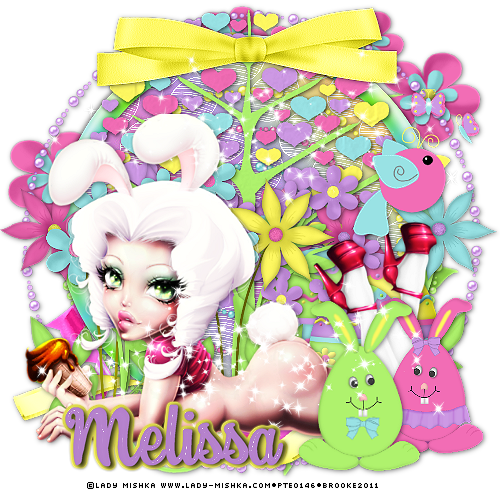
This tutorial was written for experienced PSP users
Supplies:
FTU kit called Bunny Love by Melissa's Inspirations here
Artwork by Lady Mishka here
Font is called Swing Dancer
Plug in is Eye Candy 6
Open a new image 500x500
Open frame 2
Paste as a new layer
Re size
Position
Using magic wand click on the inside of the frame
Expand by 2
Open paper 14
Paste as a new layer
Selections Invert Delete Select None
Add DS to your frame
Open the tube
Paste as a new layer
RE size
Position
Add DS
Paste these elements along with a DS:
Pearls
Pink Ribbon
Bird
Egg 1 2 & 4
Flowers 1 2 3 & 4
Flowers 11 & 12
Bow 3
Tree 1
Girl & Boy Bunny
Ribbon 4
Sparkle
Add all © info
Your name
Eye Candy Glass
Gradient Glow
Merge visible
Save as PNG!
Monday, March 28, 2011

This tutorial was written for experienced PSP users
Supplies:
Scrapt Kit called Teenage Rebel by Toxic Desirez along with
Template 165 here
Artowrk by Very Many at PicsFor Design here
Font is called Tagging Zher1
Plug in Eye Candy 6
Open your template
Delete the © info
Use papers 7,10,15,17,& 21
To transform your temp
Open your tube
Paste as a new layer
Position
Add DS
Open these elements and paste them onto your temp
Add DS to all:
Bow 3
Button Bow
Flames
Locker
Lolli's 1,2,&3
Pill
Toy
Wire
Word Art 2
String
Pencils
Skull 2
Sparkles
Add © info
Add Your name
Eye Candy Glass
Gradient Glow
Add DS
Merge visble
Save as a PNG!
Subscribe to:
Posts (Atom)
Stay Away


About Me
- Brooke
- Hello! My name is Brooke! I am from Southern Louisiana.SAHM to 3 kids and married to my best friend.I have been PSPing since Oct 2010 and loving every second of it! I love learning new things and being creative. Also a special thanks to Sue Ellen from Wicked Creationz Scraps for teaching me how to PSP!! Love you lots Sue :)
My Blinkies


Protected

Awards


Stores



My Fav Blogs







I CT For


My Blog List




Dork Sistaz


